
Baby journal
Schaban BochiParenting
0.00.00 Reviews
- Version
- 3.0.1
- Installs
- 50.00K
- Age Rating
- Everyone
Screenshots


Our Review of Baby journal
 Analysis by Appyee
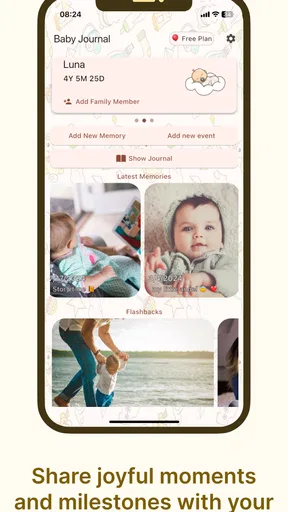
Keeping a record of a baby’s early years sounds simple until daily life gets busy. Photos end up scattered through the camera roll, small milestones are buried in chat threads, and the details that make a moment special are often forgotten. Baby journal approaches that problem as a focused parenting app from Schaban Bochi, built around saving, sharing, and revisiting memories rather than trying to become a general family organizer.
I found the idea appealing because it encourages a different habit from ordinary photo storage. A phone gallery preserves an image, but it rarely preserves the reason that image mattered, what happened before it, or how you felt at the time. A journal entry can turn a collection of pictures into a story. That distinction is the app’s strongest reason to exist, although it also means the experience depends heavily on how consistently you use it and how comfortably you manage your memories on a connected mobile device.
The app is free to install and is rated for Everyone, which makes it approachable for new parents and relatives who may not want a complicated setup. It has passed 50 thousand installs, and the current version is 3.0.1. It runs on Android 7.0 or later. Optional purchases range from $0.99 to $48.99 per item, so I would pay attention to any purchase screen before treating the free version as a complete long-term archive.
How Baby journal fits real family routines
I look at Baby journal as a place to turn scattered photos into a family story, so this section focuses on fitting that habit around the routines parents already have. A useful starting point is to decide what deserves a note before the week gets busy: one small change, a funny moment, or a visit worth remembering. That makes the next part of the workflow feel intentional rather than like another daily task.
A memory tool rather than another social feed
The most useful way to think about Baby journal is as a private-feeling space for intentional memories. It is not competing with a camera app on speed, and it should not replace a messaging app when the goal is instant conversation. Its value comes after the moment: adding context, choosing what deserves to be remembered, and creating a record that can be revisited later.
That makes it especially suitable for small events that do not justify a public post. A first attempt at standing, a funny expression during breakfast, a new sound, or an ordinary afternoon with a grandparent can all become meaningful later. The app’s store summary describes a heartfelt way to save, share, and relive special memories, but in practice the important choice is deciding what “special” means in your own family. If you only record major milestones, the journal may feel sparse. If you also capture everyday details, it can become much more personal.
I would not use it as the only place for irreplaceable photos. A journal app is a layer of organization and storytelling, not automatically a complete backup strategy. Keep important originals in a trusted photo backup system as well. This is one of the less obvious trade-offs: the more emotionally valuable the journal becomes, the more carefully you should separate the journal experience from the basic safety of your image files.
A practical evening workflow
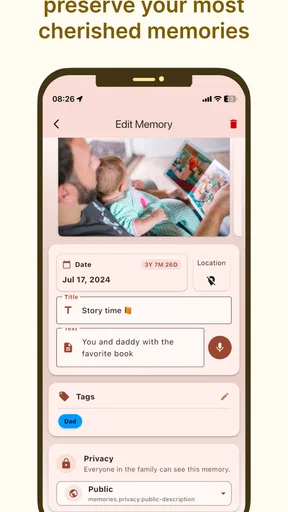
A realistic routine is to add memories at the end of the day instead of interrupting every moment to document it. Imagine a parent taking a few pictures during a visit to the park. On the way home, the phone may be used for directions and messages, so writing immediately is inconvenient. Later, when the child is asleep, the parent can choose one or two images, add a short note about the unexpected laugh or the new game they played, and save the entry while the details are still fresh.
This workflow avoids turning parenting into constant documentation. It also produces better entries than hurriedly typing while holding a child. My advice is to write enough context that another person could understand the memory years later, but not so much that maintaining the journal becomes a chore. A sentence about who was there, what changed, and why the moment made you smile is usually more useful than a long daily report.
A second helpful routine is a weekly review. Rather than opening the app only for milestones, look back over recent entries and add missing context while you still remember it. This can reveal which memories are worth sharing with family and which ones are better kept as a quiet personal record. It also reduces the risk of building a journal made entirely of photographs with no explanation.
Where connectivity changes the experience
Connectivity matters because saving and sharing memories often happen at different times. A strong mobile connection is convenient when you want to bring in recent media or send something to a relative, but it can also turn a simple journaling habit into a frustrating one if you are in a basement, traveling, or dealing with unreliable reception. I would avoid planning an important family-sharing moment around a weak signal.
The app’s purpose naturally encourages connected behavior, yet I would not assume that every part of the experience works without a network. If you are preparing a long entry on a flight, in a hospital waiting room, or during a rural visit, test the workflow beforehand rather than discovering a limitation when the memory is ready to save. The safest approach is to keep a temporary note elsewhere when the moment matters and complete the journal entry once the connection is dependable.
This is not merely a technical concern. A delayed upload can affect the emotional rhythm of sharing. A grandparent waiting to see a new milestone may receive it later than expected, while a parent may lose patience and abandon the entry. For that reason, the app works best when connectivity is treated as part of the routine: capture first, organize when convenient, and share when the phone has a stable connection.
Using it on the move
Baby memories happen in awkward places: beside a changing table, in a crowded café, in the back seat of a car, or during a visit where one hand is already occupied. A journal app has to fit those moments without demanding too much attention. I would use it in short sessions, not as a live production tool. Take the picture when needed, then write later when both hands and a few quiet minutes are available.
That approach also helps with battery and mobile-data awareness. Photos can be large, and repeatedly handling media while away from home may consume more data than expected. If your plan is limited, wait for a trusted connection before doing heavier sharing or organizing work. Even when the app itself is free, the broader cost of mobile use can include data, storage, and the time required to maintain a meaningful archive.
Parents who travel frequently should establish a simple rule: do not delete a photo from the phone until they are satisfied that the journal entry and their separate backup are both safe. This is a small but important safeguard. A tidy camera roll is not worth losing the original image, especially when an entry was created during a rushed or poorly connected moment.
Sharing without losing the personal side
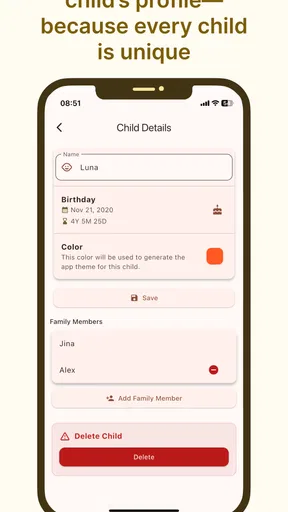
Sharing is useful when relatives live far away or when both parents want access to the same memories. Still, I would be selective. A journal becomes less intimate if every entry is treated like a broadcast. Decide which moments are genuinely useful for family members and which are meaningful mainly because they belong to your child’s private history.
Connectivity can also create a subtle social pressure: once sharing is easy, parents may feel they need to document enough to keep others updated. I think that is the wrong standard. The app should reduce the burden of remembering, not add an obligation to perform family life online. A short note shared occasionally can be more valuable than a constant stream of minor updates.
Before sharing from any family-memory app, check the audience carefully and avoid including unnecessary personal details. This is particularly important with photos that show locations, routines, medical situations, or other information a child cannot yet choose to publish. Baby journal may help organize the memory, but the parent still has to make the judgment about who should receive it.
What happens when something goes wrong
Every memory workflow needs a recovery plan. A failed upload, an interrupted session, a full phone, or an accidental deletion can turn a happy record into a stressful one. I would make entries in small batches and verify that important memories appear correctly before removing original files or assuming they are safely preserved.
If a connection drops while you are working, the sensible response is to avoid repeatedly tapping save or share. Repeated attempts can create confusion about whether an entry was duplicated or partially completed. Instead, note the essential details in a temporary place, reconnect later, and check the journal before trying again. This is especially worthwhile for a first milestone or a photo that cannot be recreated.
Families should also agree on ownership and access. If two parents use different phones, decide who is responsible for maintaining the main record and who will keep the independent photo backup. That division prevents a common failure: both people assuming the other person has preserved the memory. A journal is only dependable when the household treats it as a shared habit rather than an invisible background service.
Free access and the purchase decision
The free price makes it easy to try the basic routine without committing immediately. I would spend enough time creating a few ordinary entries before considering an optional purchase. The listed in-app items cost between $0.99 and $48.99 each, a wide range that makes it important to understand exactly what a particular purchase changes before paying.
My rule would be simple: only buy something that solves a problem you have already experienced. If the free experience is enough for occasional notes and photos, paying may not improve your family’s routine. If a paid option removes a genuine obstacle in how you save or share memories, it may be worthwhile, but the emotional appeal of preserving a baby’s childhood can make impulse purchases tempting.
This pricing structure also affects long-term planning. A low-cost experiment is different from building a permanent archive around features that might require continued spending. Keep your independent copies regardless of whether you purchase anything. That way, the journal remains a convenient presentation of your memories rather than the sole key to them.
Who will appreciate it most
I would recommend Baby journal to parents who want more meaning than a standard gallery provides, especially those who enjoy writing short reflections and revisiting family moments. It also suits families separated by distance, provided they are comfortable sharing selectively and working around the realities of mobile connectivity. A relative who wants a thoughtful record rather than a flood of random pictures may find the journal format especially pleasant.
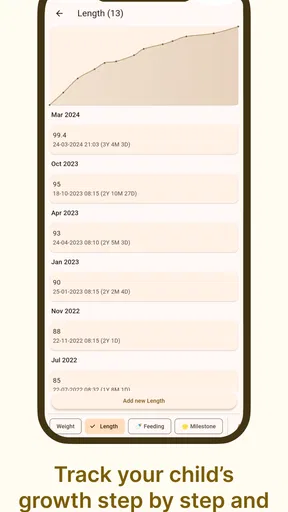
It is less suitable for someone who wants a fully automatic system. If you do not enjoy adding context, sorting memories, or deciding what deserves an entry, the app may feel like another task. A regular photo backup service is better for hands-off preservation, while a shared chat is faster for immediate updates. Parents who need detailed schedules, feeding logs, health records, or developmental tracking should also look toward a dedicated parenting tracker rather than expecting a memory journal to cover those jobs.
There is another important exception: families with strict privacy requirements should examine their own comfort level before sharing anything. A connected memory app can be convenient, but convenience should not override a household’s rules about children’s images. Use it for the memories you are comfortable managing in this format, and keep especially sensitive records in a system designed for the privacy controls you require.
My day-to-day judgement
What I like most is the app’s narrow purpose. It gives ordinary moments a place to become stories, which is something a camera roll rarely does by itself. The best entries are not necessarily the prettiest photographs; they are the ones that explain a small change in your child or preserve a feeling you would otherwise lose.
What requires discipline is the connected workflow. I would not rely on it during a weak-signal outing, and I would not treat sharing as proof that a memory has been safely backed up. The app works better when used in stages: capture the moment, write when calm, confirm the result, and maintain a separate copy of anything irreplaceable. That process is less instant than posting to a chat, but it produces a more durable personal record.
Schaban Bochi has positioned this as a parenting app rather than a broad lifestyle platform, and that focus is helpful. The current Android release supports devices beginning with Android 7.0, which keeps it accessible to many older phones. Still, your own experience will depend on the device, connection, storage, and how much effort you are willing to put into writing. No app can recover context you never record or protect a photo you delete too soon.
The connectivity verdict
Baby journal is a good choice when you want a deliberate memory habit and can accept that saving or sharing may be more comfortable on a reliable connection. I see it as a companion to your photo backup, not a replacement, and as a calmer alternative to scattering family memories across chats and social posts. Its strongest use is the quiet end-of-day entry that turns one image into a story.
Try the free experience with a handful of everyday memories, including one created while you are away from home and another you intend to share. That will quickly show whether the workflow fits your phone, connection, and family routine. If you enjoy adding personal context, the app can become a meaningful archive. If you mainly want automatic storage or detailed child-care tracking, a different category of tool will serve you better.
My final view is positive but practical: the real strength is not simply saving baby photos, but preserving why those photos mattered. Use it thoughtfully, protect your originals, avoid making connectivity a source of pressure, and share with care. Under those conditions, Baby journal offers a warm, focused way to build a family record that feels more personal than a folder of images.
Verdict
Strengths of Baby journal
- Simple layout makes daily entries quick to create.
- Photo support helps preserve memorable moments visually.
- Useful for tracking routines, milestones, and first experiences.
- Entries can create a meaningful long-term family keepsake.
- Suitable for parents who prefer journaling on their phone.
Limitations of Baby journal
- Frequent entries may become time-consuming during busy days.
- Privacy depends on the app’s security and backup settings.
- Large photo collections can use considerable device storage.
- Some features may require an in-app purchase or subscription.
- Limited value for users who prefer paper journals or shared albums.
Similar Picks in This Category
View All
Family Space
Motorola Mobility LLC.3.9

شرطة الأطفال - مكالمة وهمية
Oub Apps4.1

Findmykids: Parental Control
LETEM LTD4.6

Pregnancy + | Tracker App
Philips Electronics UK Limited4.8

Policía de niños - para padres
Kids police4.7

Pregnancy App
Amila4.9
Frequently Asked Questions
What is Baby Journal, and what can I use it for?
Baby Journal is a digital diary designed to help parents record and organize important moments in their child’s early life. You can usually use it to save milestones, photos, growth information, feeding or sleeping notes, appointments, and personal memories. It provides a more convenient alternative to a traditional paper journal, especially for parents who want everything available on their phone.
Can I add photos, milestones, and personal notes to Baby Journal?
Yes, Baby Journal is intended for documenting different types of memories and daily information in one place. Depending on the version and available features, you may be able to attach photos, write personal notes, record developmental milestones, and organize entries by date or category. Before downloading, check the app description to confirm which journaling and media features are included in your region.
Is Baby Journal suitable for tracking feeding, sleep, diapers, and growth?
Baby Journal may include tools for recording everyday care activities such as feedings, diaper changes, sleeping periods, medical information, and weight or height measurements. These features can help parents identify routines and keep useful information ready for pediatrician visits. However, the app should be treated as an organizational aid, not as a medical diagnostic or professional childcare service.
Is the information in Baby Journal private and secure?
Because a baby journal can contain personal details, photographs, health notes, and family information, privacy is an important consideration before installation. Review the app’s privacy policy, permissions, backup options, and account requirements carefully. Also check whether entries are stored locally, synchronized online, or shared with third-party services, and use a device lock or password whenever possible.
Does Baby Journal require an internet connection or paid subscription?
The requirements can vary according to the platform and the specific version of Baby Journal. Some functions, such as creating basic notes, may work offline, while synchronization, cloud backup, sharing, or account-based features may require internet access. The app may also offer optional in-app purchases or a subscription, so review the current store listing for pricing and limitations before downloading.
